

Frequently Asked Questions (FAQ) - Menoo for Restaurant Owners
Answers to the most common questions about the Menoo platform for restaurant partners
Welcome to the Menoo Frequently Asked Questions (FAQ) section, designed to provide quick and clear answers to the most common questions you might have as a restaurant partner. Our goal is to make your transition to digitized, efficient management as smooth as possible.
General & Integration Questions
Menoo is a complete digital platform (cross-platform, available on mobile and web) designed to optimize restaurant operations. It lets you manage home delivery orders, takeaway orders, interactive virtual menus, and direct table orders (without needing a waiter to take the initial order). Menoo helps you increase sales, streamline your staff, and deliver a modern experience to your customers.
Menoo stands out with its all-in-one approach. Unlike other platforms that focus only on delivery, Menoo also integrates interactive digital menus, table ordering, and staff management (waiters, drivers, cooks) into a single solution. This reduces operational fragmentation, simplifies processes, and gives you full control over your brand and customer data.
Menoo is designed as a comprehensive solution that covers most operational needs. We provide an order intake system (delivery, pickup, dine-in), digital menus, and staff management. You can choose to use your own drivers (integrated through the Menoo Waiter app). We also offer integration options with existing POS systems for seamless data synchronization.
Implementing Menoo is designed to be as simple as possible. The Menoo Partners platform (admin dashboard) is intuitive. You can upload your menu quickly using AI, configure delivery zones, and add staff in just a few steps. Our support team is also available to assist you throughout the entire process.
Yes, absolutely! Menoo excels at managing table orders. By generating and placing unique QR codes at each table, customers can scan, view the digital menu, place orders directly, and even call the waiter — significantly improving service efficiency.
Yes, Menoo is a cross-platform solution. Customers can access the menu and place orders both through the Menoo mobile app and directly via web browser, offering maximum flexibility. The admin panel (Menoo Partners) is also accessible through a web browser.
Menu & Products Questions
You have two simple methods for adding your menu:
- With AI: Upload a PDF or images of your existing menu, and the AI system will automatically detect products and prices, populating your digital menu.
- Manually: You can manually add categories and individual products, with full control over every detail. Both processes are intuitive and designed to be fast.
Yes, you can upload PDF files or images of your menu. Menoo's AI is advanced and can quickly detect most products and prices. However, we always recommend a manual review afterward to ensure 100% data accuracy and make adjustments if needed.
Yes, the Menoo platform allows you to enter complete details about allergens (gluten, lactose, nuts, etc.) and nutritional values (calories, protein, carbohydrates, fat, etc.) for each product.
Absolutely. For each product, you can add customizable options and modifiers. You can define option groups (e.g., "Size", "Sauces", "Extras"), set whether they're required or optional, and assign an additional price for each option.
Yes, each product has an "available" toggle that you can turn off temporarily without deleting the product. You can also manage category visibility.
Orders & Payments Questions
Orders are received in real time in your Menoo Partners dashboard and in the Menoo Waiter app. You'll get instant notifications and can view details, update progress, and complete orders.
- On your phone, in the Menoo Waiter app.
- On a device with thermal printer support (available for rent at 50 RON/month).
Menoo supports:
- Online card payments
- Apple Pay
- Google Pay
- Cash on delivery or pickup
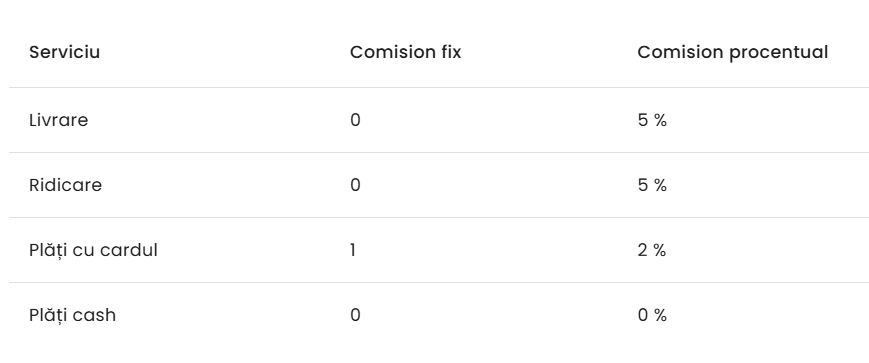
The fee structure is detailed in the "Finance" section of Menoo Partners.
Funds are transferred to your account according to the terms agreed with the payment processor (typically within a few business days).
Yes, the "Orders" section in Menoo Partners provides all of this information.
Delivery Questions
Through the Menoo Waiter app. Each driver has a dedicated role and access to order details.
From Menoo Partners > Settings > Deliveries.
Yes, this option is configurable in the deliveries section.
Staff Questions
From Menoo Partners > Employees. Assign roles and create accounts with email and password.
- View tables and orders
- Access to bills
- Ability to edit/cancel orders
- Respond to customer calls
- View order list
- Mark orders as "in preparation" or "ready"
- Notifications for new orders
Marketing & Customer Service Questions
Through attractive digital menus, visibility in the app, promotions, and social media links.
By phone for delivery/pickup orders, and directly at the table for dine-in orders.
Analytics & Reporting Questions
Sales reports by time period (daily, weekly, monthly) and by channel (delivery, dine-in).
Yes, channel segmentation is available.
Technical Support Questions
The Menoo support team, via email, phone, or ticket.
Yes, Menoo offers an online help center with articles and tutorials.